Storage tiering: transcode old footage down
After a configurable window, older recordings transcode down to 1080p or 720p, freeing bytes for the next stretch of high-res. Same scene, smaller bucket, same operator surface.
 GitHub
CrumbVMS is a self-hosted video management system built around the seat you review footage from: operator-grade timeline scrubbing, a fast multi-camera wall, polished native clients. The kind of software that runs control rooms, on your own hardware. Yours.
If you have spent time in a commercial control-room VMS, the investigate workflow will feel familiar.
Free and open source, AGPL-3.0-or-later. It's early (v0.2.0 alpha); bugs and feedback go through GitHub Issues and Discussions.
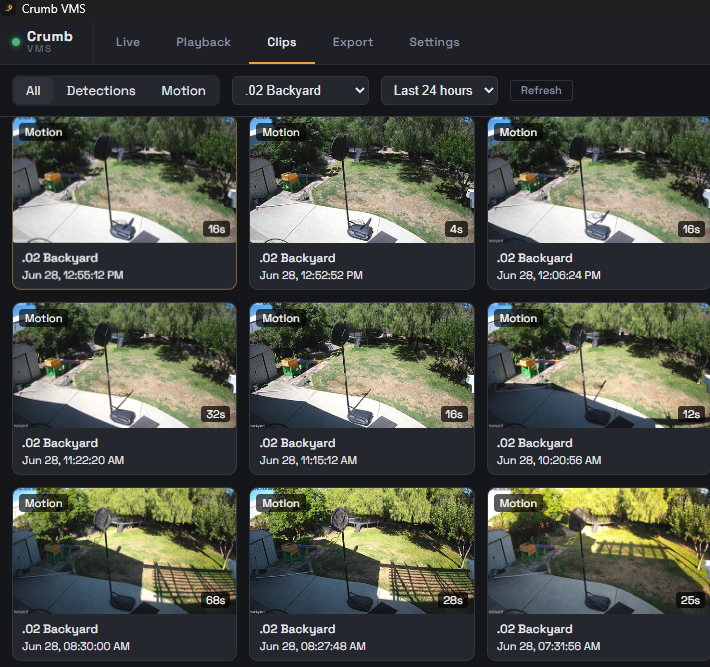
I spent about thirty years in IT and worked with most of the enterprise NVRs along the way. One commercial VMS, the kind that runs control rooms, got the client experience right: grab the timeline and scrub a dozen cameras frame by frame, hunting for a gray blob of pixels in grainy 3 a.m. footage, and the software just keeps up. Then it revoked my test license and removed its free camera tier, and I found there was nothing self-hosted that felt like that. The open-source world had solved detection brilliantly, Frigate does it better than anything I could build. Nobody had built the seat you review it from. So I built it: a multi-camera wall, a timeline you can actually scrub (H.265 included), native clients on every device. Three surfaces, one backend.
I'm an IT engineer with thirty years in the field, building CrumbVMS on my own time. It runs my own house right now: eleven cameras, multiple storage volumes, recording day in and day out for months. About 90% of where I want v1 to be.
Most polished: the recording server, the Windows desktop client, and the Android app. Newer and rougher: the macOS and iOS apps are a shared native SwiftUI codebase, the Mac app runs today; the iOS app works on my own iPhone but isn't something I can hand you yet (see the clients below). The remaining 10% is the boring, important part: hardware variety, different cameras, CPUs, drives, network topologies. That's exactly what running it on hardware that isn't mine, and GitHub Issues, are for. I've run 30+ days without losing footage on my own setup; I can't promise that for yours yet.
Full transparency: I'm using AI to build CrumbVMS itself, and to build this page. The architecture, the decisions, and the testing are mine, AI is the power tool that lets a side project move at this pace.
My long-term goal is to make CrumbVMS installable by anyone, click an installer, point it at your cameras, done. We're nowhere near that today. Right now CrumbVMS is for technical users comfortable bringing up a Docker container on a Linux host; a browser-driven first-run wizard handles the rest.
On licensing: CrumbVMS is free and open source, under AGPL-3.0-or-later, every client, no camera limits. Voluntary sponsorship is welcome if it keeps the lights on, but it's not why I'm here.
Recording segments, motion events, and per-object detection icons all live on one bar. Hour ticks at top, transport at the right, jump-by-time chips for fast triage. From a 24-hour overview down to a 60-second slice. Same interaction.

CrumbVMS is the recorder, the storage policy engine, the timeline, the live wall, and the native clients you actually use day-to-day. One backend, three ways in.
Two OCR engines you pick per camera: Frigate's native LPR, or Crumb's own CPU-only fast-alpr worker for the wide entry angles Frigate misses. Both run on your box, no cloud, and Crumb's own worker needs no GPU. Set a camera to Both and the desktop Benchmark screen puts them head to head so you can see which one actually wins on your cameras. Watchlist alerts, an ignore list, and fuzzy matching that treats confusable characters (O/0, I/1, B/8) as free. Name a plate once and the name follows it everywhere, and any sighting exports as a one-page PDF report.
Link a camera to your HA entities and drag their live state onto the frame as badges. The front-door sensor reads "Open" right where the door is; a temperature badge shows its real value and units. As of v0.2.0 those badges are interactive: tap the porch light to switch it on, or open its card and drag a slider for brightness, cover position, or fan speed, without leaving the camera. Self-hosted, REST-polled, authored in the console. State honesty is built in: an unknown or stale entity goes grey and dimmed, never a false "closed."
Rust-based recorder with per-policy size caps and a Postgres-backed segment index as the single source of truth. In motion mode, footage buffers in RAM and only persists when motion fires, idle time is never written to disk. Everything lands as plain MP4 files on your disk, in an open schema.
Hour-by-hour timeline with crumb-trail recording segments, motion event dots, per-object detection icons, and a playhead that snaps to the next event with one keypress.
Desktop: Flutter + libmpv, the full investigation surface, built to live full-screen 24/7. Android: Kotlin/Compose, pull footage from anywhere, adaptive Auto / Full / Data saver quality plus a low-bandwidth snapshot mode for cellular. macOS: native SwiftUI, a download you run today (rougher edges). iOS: same codebase, built and working on my own phone, but Apple only lets you distribute an iOS build through TestFlight, which needs a paid developer account I haven't set up yet. So iOS works; I just can't hand it to you yet. Being straight about that. Web: admin console at /admin. H.264 and H.265 both play smoothly, and for the rare camera whose H.265 main a phone's decoder rejects, an opt-in on-demand server repair serves an HD stream it can actually play.
Captured from the desktop build I run on my own hardware.
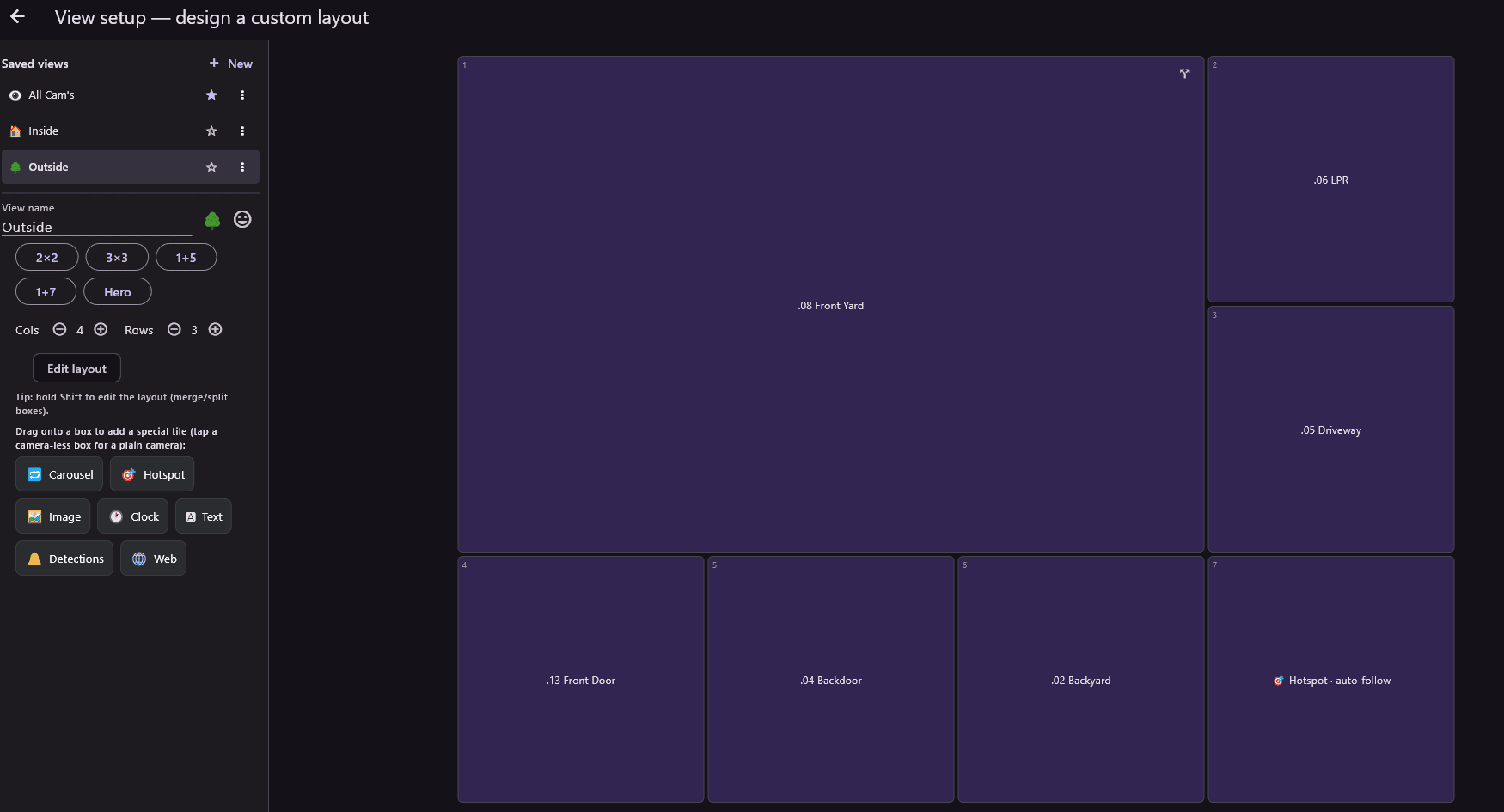
Start from a preset or set your own rows and columns, then merge and split boxes until the layout matches how you actually watch. Drag cameras into panes, or drop in a special tile: carousel, motion-following hotspot, clock, text, detections, a web page. Name each view, give it an icon, switch with one click. Saved per device.
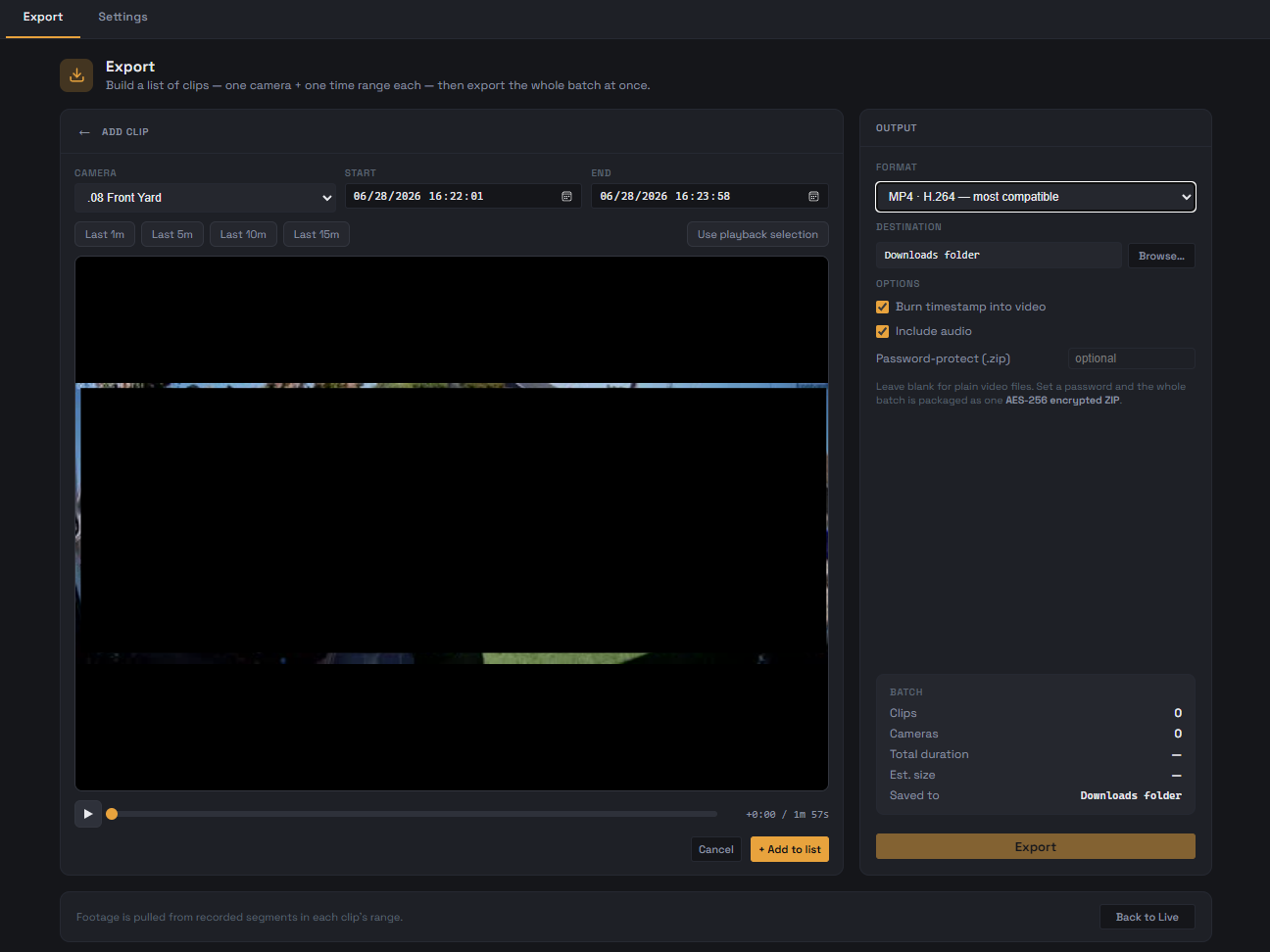
Add multiple clips from multiple cameras, then export the whole list at once. Output as plain MP4 files or as a single AES-256 ZIP with a password. Burn the timestamp in. Lands in your Downloads folder.
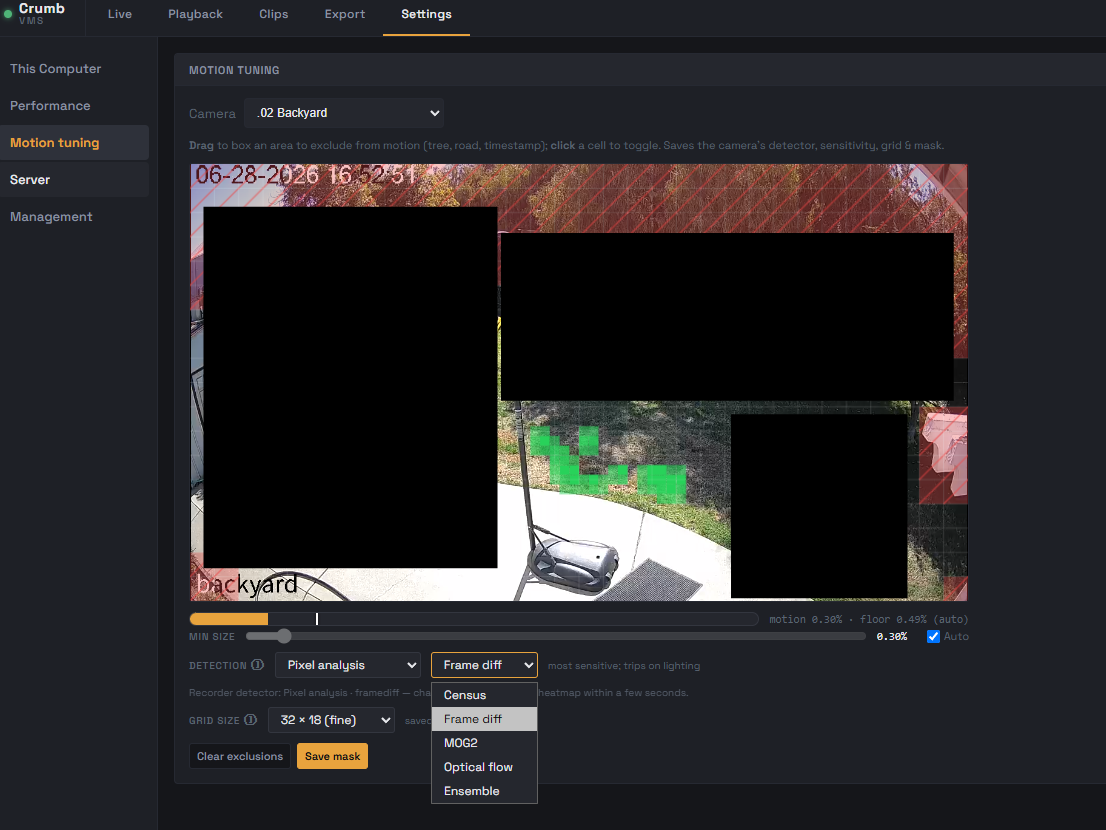
Draw exclusion zones right on the live image. Swap detectors (Census, Frame diff, MOG2, Optical flow, Ensemble) per camera. Watch the sensitivity and floor live as you tune.
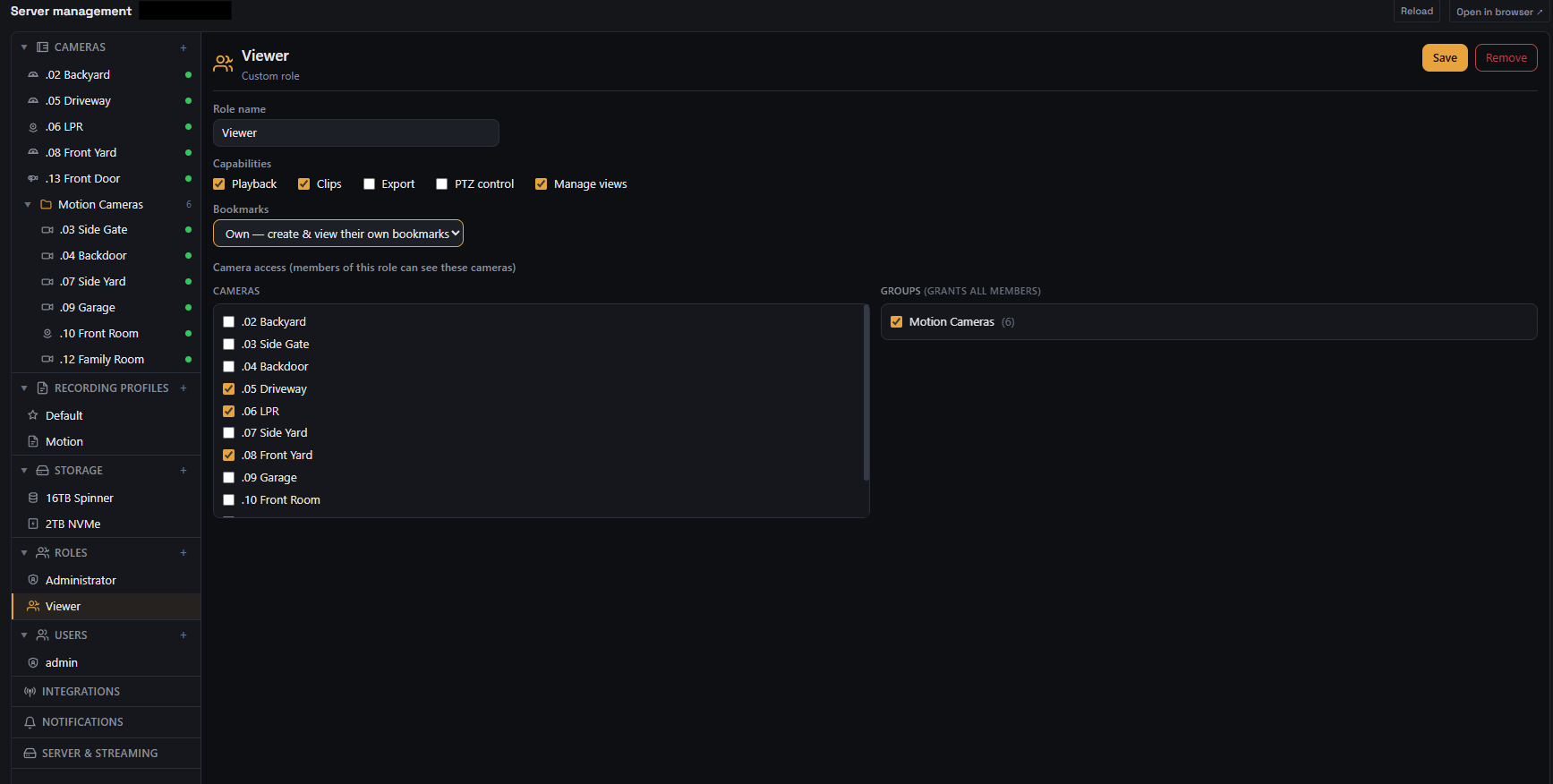
Custom roles with explicit capabilities: Playback, Clips, Export, PTZ control, Manage views. Camera access by individual camera or by group. Bookmarks scoped per-user.
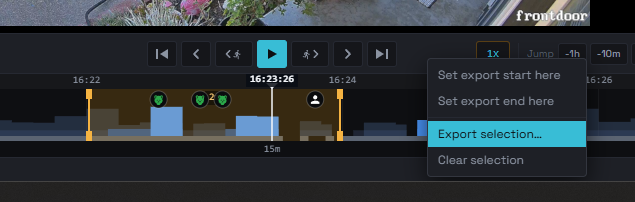
Drop a start and an end on the timeline, send the selection straight to the export list. Per-object detection icons from Frigate stay on the bar so you can see exactly what you're picking before you pick it.
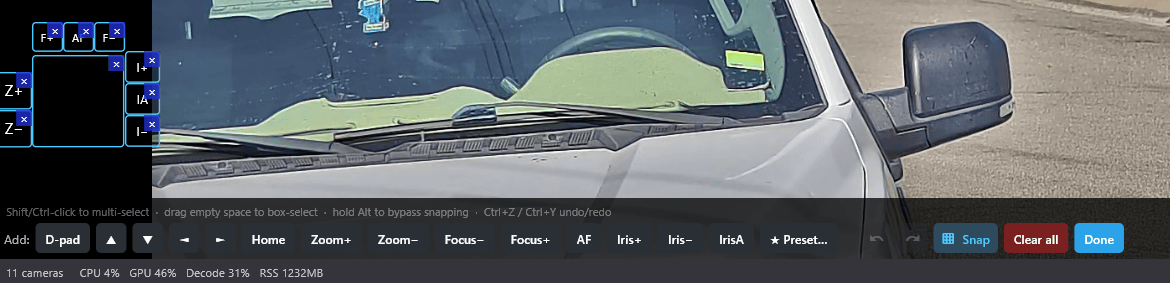
Edit mode turns the live tile into a canvas. Drag ONVIF d-pad, zoom, focus, iris, home, and preset buttons anywhere on the frame, resize them, snap them to each other, rename them. Undo and redo while you fiddle. Saved per camera on the desktop client.
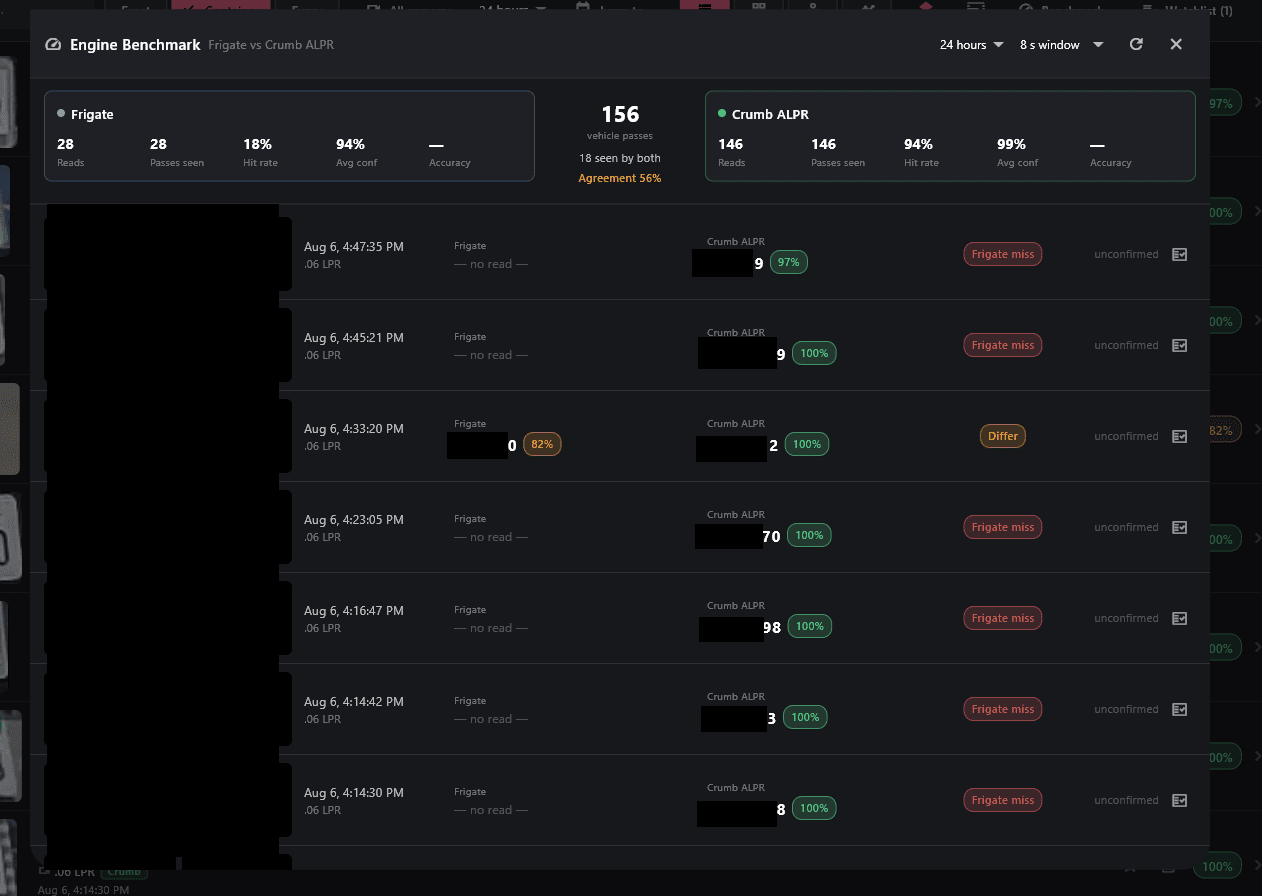
Set a camera to run both engines and the Benchmark screen scores them side by side over a window you choose: reads, hit rate, average confidence, and every pass where they agreed or differed, with the crops to check it yourself. The two engines are built for different jobs, so the answer moves with the camera, the angle, and the light. The camera above is a wide entry-angle cam, which is exactly what Crumb's own engine was added for; on a dedicated head-on plate camera the numbers can land the other way. The point is that you get to measure it on your hardware instead of guessing.
Most web viewers struggle with H.265, which is now the default on serious cameras. CrumbVMS hands frames straight to libmpv on desktop and Media3 on Android, so 4K H.265 plays without judder, without server-side transcoding, in both live and recorded playback. A pre-generated preview proxy makes revisiting a spot on the timeline a cached read instead of a fresh 4K decode, which is what keeps scrubbing instant.
Hour ticks, recording segments as crumbs, motion events as dots, per-object detection icons (person / car / animal / package), pinch-to-zoom, and a snap-to-event playhead.
Illumination-invariant census-transform foreground with a percentile-histogram floor, so headlights and moving shadows stop tripping recording at 3 AM. Draw exclusion zones for the wind-blown trees. Trial it in shadow mode on real footage before flipping a camera to motion-only.
Named recording policies with live / archive storage tiers; every camera is on exactly one policy, so there's no inheritance chain to reason about. Per-policy size caps and free-space headroom, and an optional maximum-retention cap that deletes footage past N days, protected bookmarks survive it.
Dedicated Setup mode. Drag any camera into any pane, save the layout per device, switch with one click. Tab persistence so the wall comes back the way you left it.
Place ONVIF d-pad, zoom, home, focus, iris, and preset buttons anywhere on the live tile. Resizable, snap-aligning, renamable. Per-camera, persisted on the desktop client.
Motion and detection notifications to Discord, Slack, Telegram, Pushover, ntfy, or a generic webhook, snapshot attached where the service takes one. Named channels with alert text you write yourself, per-camera rules, quiet hours, snoozes, and presence gating so it can stay quiet while you are home.
Nothing is transcoded ahead of time. Footage records straight to disk, and smaller streams and clips are generated the moment something asks for them, cached, then evicted. The local plate reader is CPU-only and motion-gated. A recorder runs 24/7, so it should sip power, not cook a GPU transcoding footage nobody is watching.
After a configurable window, older recordings transcode down to 1080p or 720p, freeing bytes for the next stretch of high-res. Same scene, smaller bucket, same operator surface.
Draw black-out zones over neighbors' windows or license plates. Apply globally or scoped per role, so a Viewer sees the redacted footage and an Admin sees the raw.
When one box isn't enough: federate two or more CrumbVMS hosts, see all their cameras in one wall, query timelines across all of them at once.
Use CrumbVMS as the operator layer next to a Frigate setup you already run: ingest the same cameras through Frigate's go2rtc, keep Frigate doing detection, and let Crumb record its own copy with the multi-camera wall, H.265 scrubbing, export list, and RBAC on top. One honest constraint: the frame-level scrub is a record-time property, so Crumb records its own footage rather than reading Frigate's existing archive. Your Frigate keeps its recordings; Crumb builds its trail alongside.
Tell me which of these matters most to you in GitHub Discussions.
Use this as a sanity check, not a requirement. CrumbVMS is designed to scale down to weaker boxes too. My own testing is on Intel + NVIDIA; AMD (Ryzen / Radeon) should work, CPU decode is vendor-neutral and VAAPI covers AMD iGPUs, but it isn't tested yet.
I ran a controlled A/B on the recorder host: motion-detection decode on CPU versus NVDEC, 11 low-resolution sub-streams. NVDEC's fixed activation cost dwarfs the actual decode work at this scale, so CPU wins on power until camera count or resolution scales up.
| Metric | NVDEC (cuda) | CPU | Delta |
|---|---|---|---|
| Wall meter | 105 W | 73 W | −32 W (−30%) |
| GPU power | 36.6 W | 8.8 W (idle) | −27.8 W |
| Recorder CPU | ~26% | ~33% | +7% (about 0.08 of one core) |
| GPU temperature | 51 °C | 35 °C | −16 °C |
Decode mode is admin-selectable per server: auto / cpu / cuda / vaapi (VAAPI drives an Intel iGPU instead of a discrete card), and the admin console shows the requested-vs-active decode per camera. Changes hot-reload without a full restart.
No application, no invite, no waiting list: the code is public, so anyone can grab it and run it. The smoothest path today is a Linux host running the Docker stack, with Windows on the desktop and Android on the phone, the most-tested clients. The macOS app is ready to try too, just rougher, an unsigned download you open past Gatekeeper. iOS is the honest exception: it's built and runs on my own iPhone, but Apple requires a paid developer account before I can distribute it (even through TestFlight), so I can't hand it to you yet.
I'm looking for two things in a tester: you're comfortable with the possibility of losing footage (I've run 30+ days without an incident on my own setup, but I can't promise that for yours), and you're happy to share feedback about what worked, what didn't, and what surprised you.
NVIDIA GPU is optional (CPU motion detection is the default and benchmarks fine for typical residential loads). x86-64 + Docker is the supported floor today. Tested on Intel + NVIDIA, AMD (Ryzen / Radeon) testers especially wanted: it should work, but I haven't verified it.
Get it on GitHub, stand it up (the README walks you through it, or hand the AI install guide to your coding assistant), and run it for a while. One honest ask first: read the Alpha Tester Terms and the responsible-use guide. CrumbVMS is pre-release software provided as-is with no warranty, you shouldn't rely on it as your only security system, and lawful use is your responsibility. Recording people, especially audio, is regulated in many places.
Get it on GitHubThen tell me what broke, and what didn't. Bugs, rough edges, and confusing install steps go to GitHub Issues; questions, ideas, and "here's how it ran on my hardware" notes go to GitHub Discussions. Prefer email? [email protected] reaches me directly. I read every one.
No NDA, no account with me, nothing to sign up for. CrumbVMS is free and open source (AGPL-3.0-or-later).
CrumbVMS does not bundle Frigate, and object and face detection stay Frigate's job. Motion detection is built in, and plates are the one thing Crumb will read itself, with its own local engine. If you already run Frigate, point CrumbVMS at your MQTT broker and map each camera to its Frigate name. That's the entire integration.
If FRIGATE_MQTT_URL is empty, the entire detection subsystem stays disabled. Zero magic, zero coupling.
Same principle: HA stays your automation brain, Crumb just gives it a seat on the glass. Connect it once and link a camera's entities from the admin console or the desktop app, no YAML.
Leave Home Assistant unconfigured and none of it runs. Same zero-coupling rule as Frigate.
Crumb could already show a linked Home Assistant entity's state on the live wall, but that was as far as it went, and setting the links up was a thin, awkward surface. This release rebuilt the authoring layer and made the badges interactive. You still keep Home Assistant as the automation brain; Crumb is just one more place to see it and touch it.
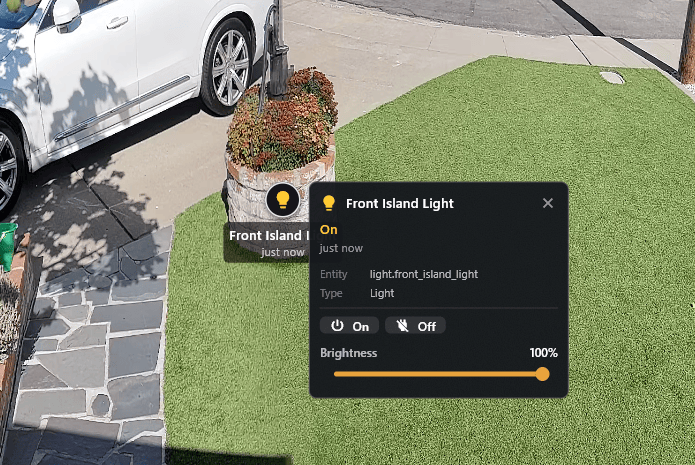
A single tap actuates a simple device such as a light or a switch. Covers and locks open a card first, so you don't unlatch a door by brushing the glass. Dimmable lights, covers, and fans get a slider for brightness, position, and speed, and it commits once when you let go rather than spamming your instance while you drag.
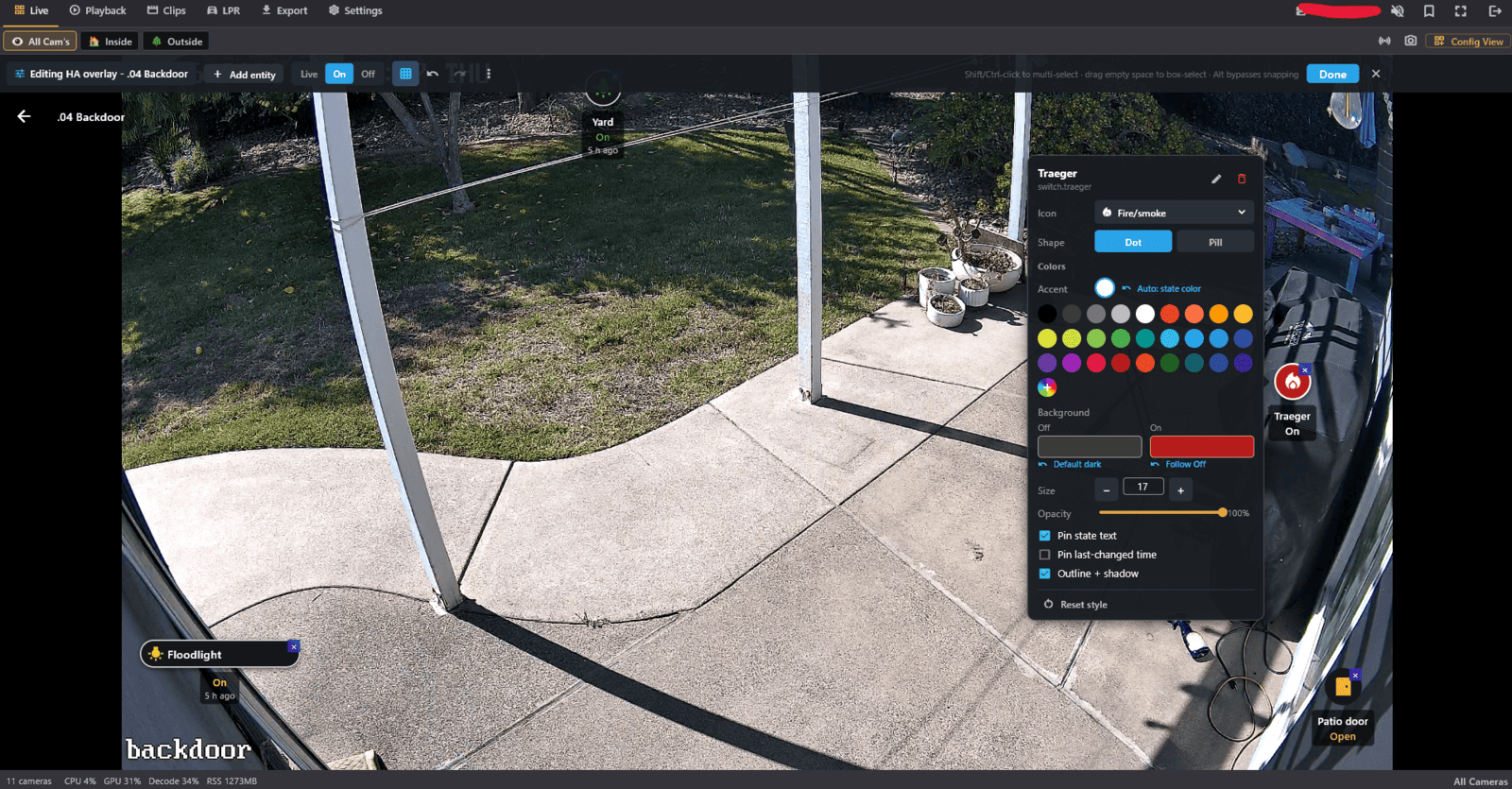
Place a badge where the device physically sits, then pick its icon from one canonical set, its shape, its accent color, and separate backgrounds for off and on. Size, opacity, pinned state text, pinned last-changed time. The icon list is shared and enforced server-side, so what you pick on the desktop shows up the same on your phone instead of quietly falling back.
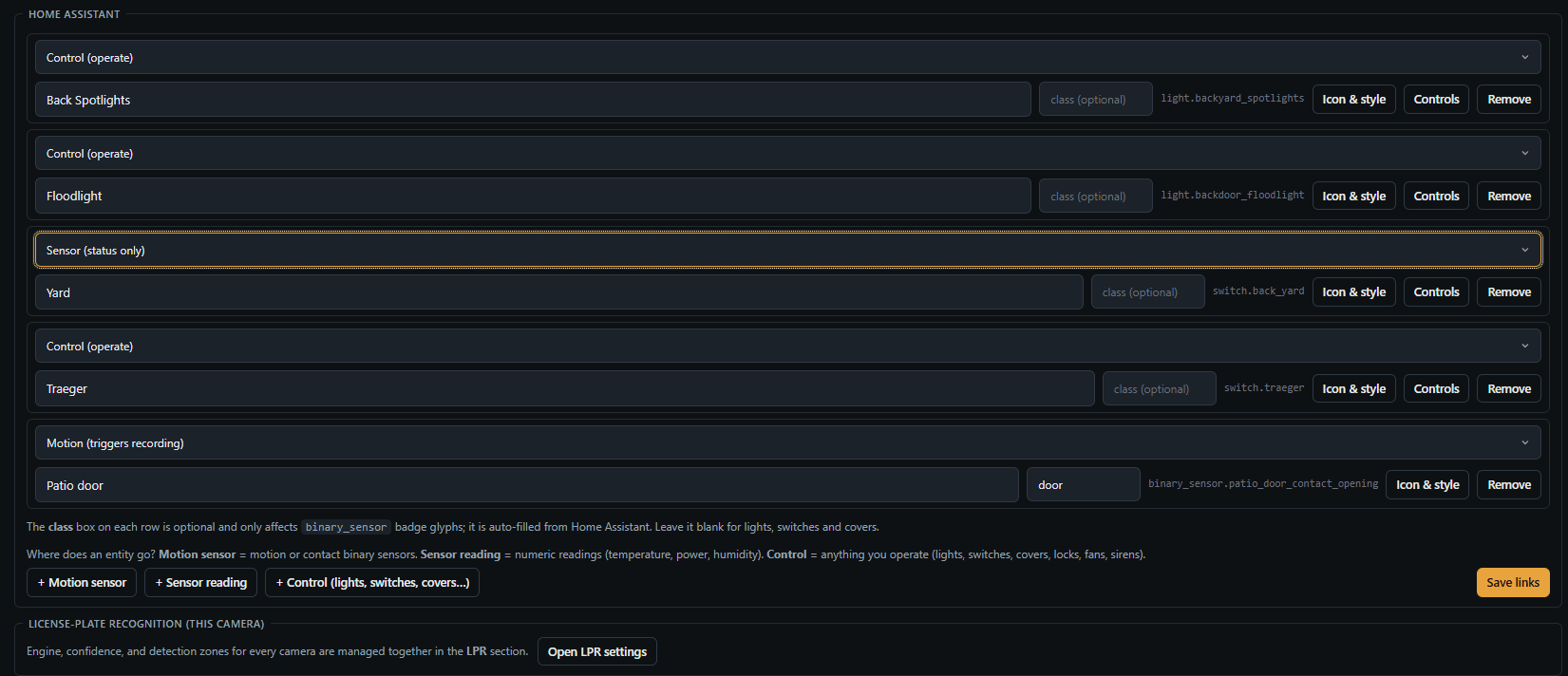
Home Assistant now has its own area in the admin console instead of a scattering of per-camera fields, with a global view of every link and a flag on any link whose entity has disappeared from your instance. The picker covers every controllable domain plus numeric sensors, and each link carries its own role, label, device class, icon, overlay style, and control rules. Same screen on the desktop app if you'd rather stay there.
All of it is opt-in. No Home Assistant URL and token means none of this subsystem runs at all, and even with it configured, acting on a device needs a role capability that is off by default.
CrumbVMS is a Docker stack you bring up on a Linux box, a NAS, a mini PC. Anywhere you can run a container. Recordings are plain MP4 files on a disk you own, in an open schema. The configuration plane is a web UI on your LAN, and the native clients talk to your server. And yes: no cloud, no account, no telemetry, and nothing leaves your network unless you make it. That is how self-hosting works, not the reason to run it.
Secrets are generated for you on first boot. The admin console walks you through creating your administrator account. Every key is documented and the Postgres schema is open, so nothing about how it works is hidden from you.
A running log of releases, fixes, and design notes. RSS · all updates
Crumb could put a Home Assistant entity's state on the live wall, but you could not do anything with it, and setting the links up was a thin, awkward surface. v0.2.0 rebuilds the authoring layer and makes the badges interactive: tap a light, drag a slider, read a sensor's real value off the frame. Plus adaptive live-wall quality on every client and human-readable plate names.
v0.1.1 is a hardening release. An intensive multi-model audit swept the recorder, the API, every client, and the seams between them, finding each issue, trying to disprove it, then fixing it. Sixty-plus changes, almost none of which change what Crumb does, all of which change how much you can rely on it.
Any single plate sighting exports as a clean one-page PDF from the desktop client, with the plate, the time, the camera, the full frame plus crop, and a recent-sightings dossier. For handing a sighting to someone without screenshotting the app.
Link a camera to your Home Assistant entities and drag their live state onto the video as badges. Self-hosted, REST-polled, configured in the console. State honesty is built in.
The code, the install guide, and the conversation all live in one place now. Grab it, run it on your hardware, and tell me what you find in Issues and Discussions.
Get it on GitHubcrumbvms.com · self-hosted video management